Do you have so many emails in your inbox that you have no hope of ever getting on top of them. Do you look for emails sent to you last week or last month and struggle to find them?
This is a really common problem I hear from people all the time. It generally comes with a self-deprecating laugh – “Oh I have so many emails, I don’t know what to do! I can’t keep up!”
Funnily enough, it’s NOT something to be proud of. It means that you’re not managing your time efficiently – that you’re wasting time!
I can teach you how to get on top of this problem – I run a webinar session on Releasing Time to Lead and I have taught 1000s of managers and leaders how to do this. Believe me, you can do it too!
One manager I worked with confessed that she had 30,000 emails in her Inbox! After the session, she went through them and got them down to 10,000 – an improvement but still a long way to go.
The first step is to delete or archive everything in your inbox. Then send out an email to all your correspondents / colleagues explaining that you’re behind on email and if they have emailed you about something extremely important, they should email you again. On average, less than 10 per cent will come back with another email!
Now you can start afresh so here’s some tips to help you manage your emails once you’ve cleared the decks.
The first thing you need to do is set up Personal Folders. This is a set of folders which you can label with titles that are meaningful to you in your role. Things like:
· Finance
· HR
· Reports etc
Decide what works for you – start with just a few and add more as you need them.
Now let’s think about what happens when you receive an email. Here’s the Releasing Time to Lead model for email management.
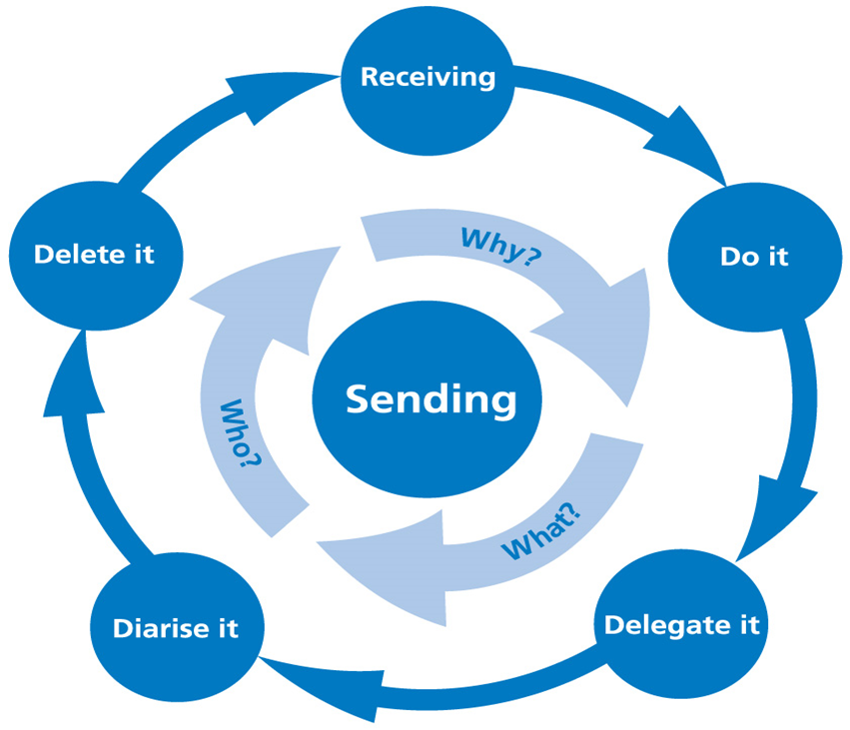
The Releasing Time to Lead Model for Email Management
Receiving emails
There are four steps which you should follow:
· Do it – if you can deal with it within 2 minutes then DO IT!
If it’s going to take more than 2 minutes, then:
· Delegate it – if you can delegate to a member of your team, then delegate it.
See my blog post on My Mantras! You should ONLY do the things that ONLY you can do. Everything else should be delegated!
· Diarise it – set aside a time in your calendar to action the email if you cannot take action immediately. You can do this easily by just dragging from your Inbox to your Calendar and allocating a day and time.
And finally make sure that you -
· Delete it – don’t keep emails in your inbox. Once you’ve dealt with it, then delete the email or file it for reference in one of your personal folders as soon as it is actioned.
Now what happens when you send an email.
Sending emails
When sending emails, ask yourself –
Why am I emailing?
What am I hoping to achieve by sending this email? Am I only sending this email to put off having a difficult conversation?
Is an urgent response needed? If so, an email may not be picked up in time. Need a response within 48 hours? Don’t email! A phone call would be better or think about talking face-to-face.
What is the purpose of the email? Is the subject line clear? Make sure you state what the email is about, what you want the recipient to do and what the timeframe is in the email heading!
There’s a 3-point approach – action, purpose, timeframe.
1. Start with the action -
• “Action required” means a physical action is required, i.e. complete a form
• “Response required” means that you want a response
• “For information” means there is no action required, this is just for your information (in which case, file it!)
2. Describe the email’s purpose, e.g.
• Action required: Questionnaire on staff morale.
3. State the timescale, if necessary, e.g.
• Response required: Questionnaire on staff morale due 7 June.
What am I emailing?
Your emails should be short, concise, and action focused.
Be careful about the tone of your email. Only use bold and underlining to emphasize key points. Use paragraphs, bullets and numbering to structure the email. Try not to use abbreviations and don’t use CAPITALS! (that comes across as shouting!).
Wherever possible and appropriate, avoid sending email attachments especially when the recipient has access to the same server and shared files. Offer to send the information if requested – do not default to sending it out to everyone. Make sure you remove attachments from emails that are being forwarded and reduce the size of documents using the zip file application where possible.
And think about what the email says about you.
And finally, Who am I emailing to?
Consider who you are sending an email to.
• To – people who are required to take action,
• CC – people who are copied in for information - Don’t cc everyone – only use the cc function if you really need to.
• BCC – should not be used without good reason.
BCC (or blind copy) is sometimes used to copy people in where the sender doesn’t want the recipient to know who it has been send to – don’t do this. I’ve seen it done in HR situations but it only creates problems. On the other hand BCC can be useful for sending an email to a group of people without disclosing their personal email addresses.
In summary -
Use rules to manage your inbox! If the email is from your boss or the CEO – for people in authority above you - set up a rule that puts their emails into a separate folder that you can access immediately.
If you are cc-ed into an email, set up a rule where the person receives an auto message explaining that you won’t read their email immediately as you assume it was just for information. If, however, they need you to actually DO something, then they need to re-send the email and put you in the ‘To’ list, not the ‘CC’ list.
And finally – Out of office emails!
Out of office email notifications are really useful. If you need an urgent response, an email is not a great way to communicate and if someone is away and won’t be picking up the email for 2 weeks, it’s useful to know that so that you are going to need to contact someone else.
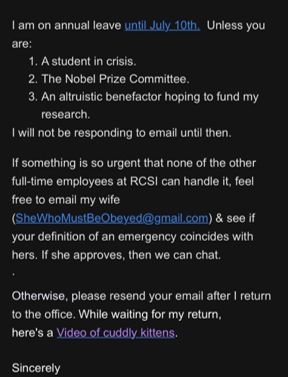
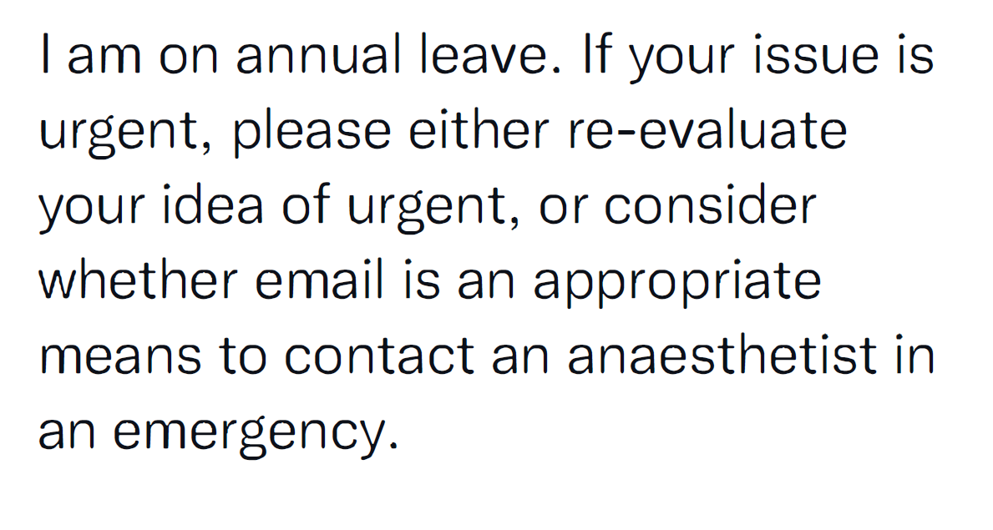
Here’s a couple of great out-of-office notifications!
Between the 13th of June and the 1st July, I will be learning to pilot a boat around Halong Bay, Vietnam. I also plan to attempt to barefoot waterski.
During this time, I will not:
• Answer any emails
• Model any scenarios
• Deliver any presentations
• Think up any planning methods
• Give you up
• Let you down
• Run around and/or desert you!
Please contact Rob Graham for any issues during this time. Rob also knows how to get hold of me in a desperate, horrific, everything-is-on fire emergency.
Want to know more? I run a webinar on this topic. Contact me to find out more!